
Connector Certificate Trust Renewal
Connectors authenticate themselves to the SSE Management service using mTLS authentication. To make this possible, each connector goes through a certificate enrollment process at the time of creation. These certificates get automatically renewed as part of the product lifecycle and SSE administrators don’t generally need to pay attention to this.
As a one-time action resulting from the PKI infrastructure update, SSE connectors provisioned before July 26, 2026, need to renew their certificate trust. To simplify this process, the SSE Management Console provides a guided workflow that enables administrators to complete the certificate renewal without service-impacting actions such as connector redeployments or upgrades.
Administrators can tell if any of their connectors are in need for servicing if any of them present an alarm message in the UI as in the example below.
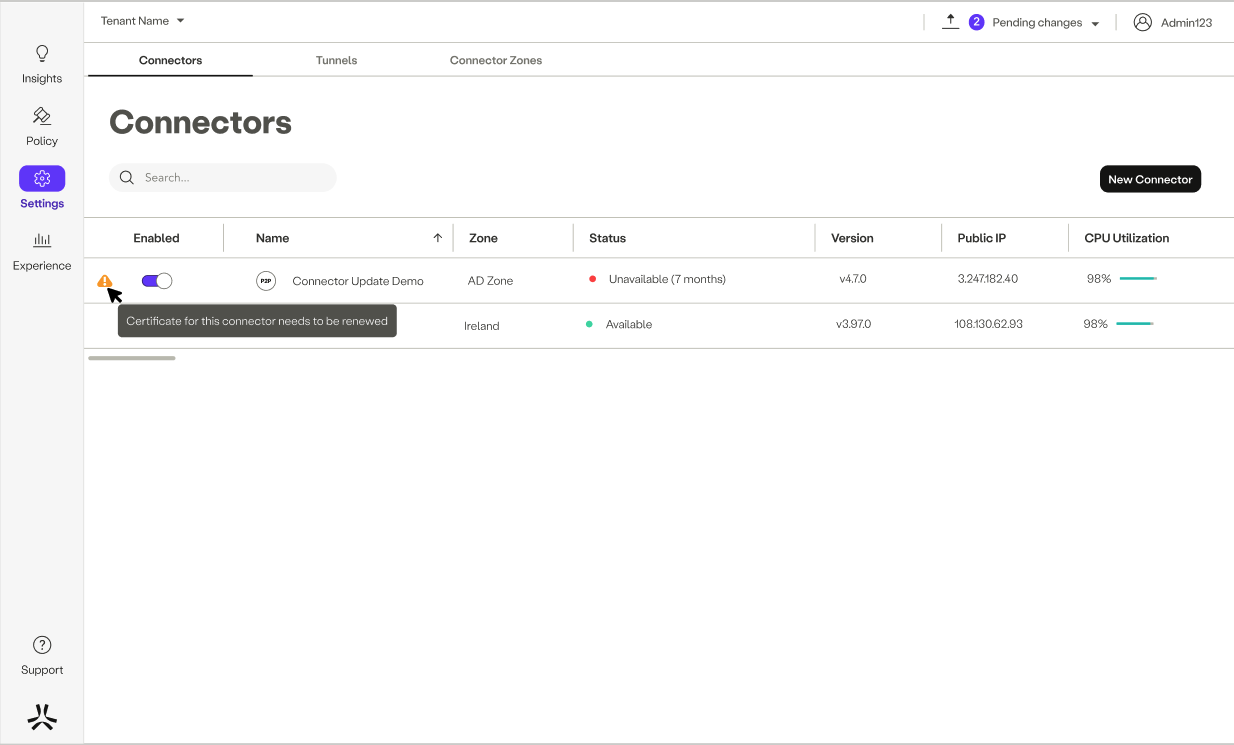
Certificate trust renewal process
Before you begin
- Make sure you can sign in to the SSE Management Console.
- Make sure you have SSH access to the connector host.
Renew the certificate
To renew the certificate trust for affected connectors, go to Settings > Connectors in the HPE Networking SSE Management Console. Once there, locate the connectors that requires certificate renewal and choose Renew Certificate from the actions on the right.
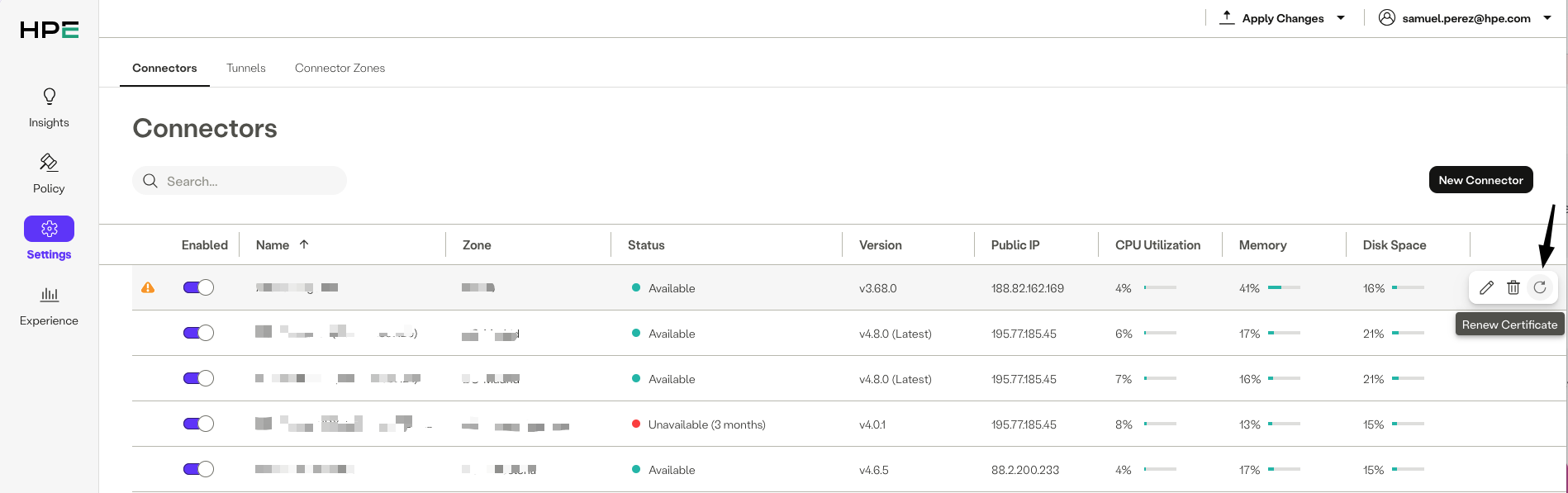
This triggers the certificate trust renewal workflow, which provides a short-lived string to be pasted into the connector’s CLI. Use the copy button to copy it to your clipboard:
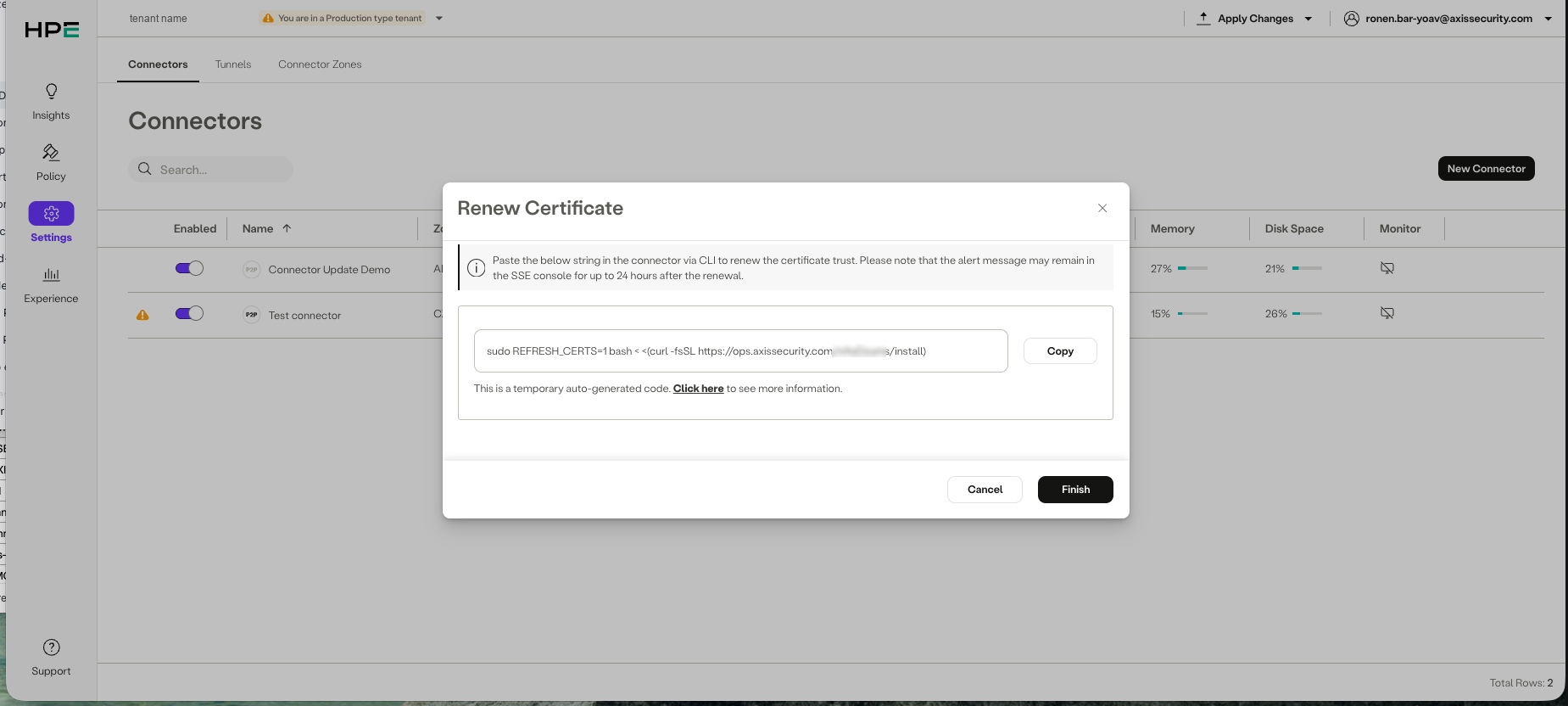
The string should then be pasted “as is” into the connector host. It should run as shown below:
> \[root@####### \~]# sudo REFRESH_CERTS=1 bash \< \<(curl -fsSL [https://ops.axissecurity.com/RZnJ8Nu6/install](https://ops.axissecurity.com/RZnJ8Nu6/install))
> Detected Axis connector config file
> Using the following flags:
> AX_MASQUERADE_POOL_NETWORK  "100.96.0.0/11",
> AXIS_OVA                    1
> AXIS_BACKEND_TCP_ADDRESS    backend-tcp.axissecurity.com:443
> AXIS_BACKEND_UDP_ADDRESS    backend-udp-ga.axissecurity.com:443
> Axis Connector OVA Detected
> Checking prerequisites...
> Waiting for axis service to complete
> Installation: Step 1/6 Completed
> Downloading components...
> Download Connector System - Step 1/2 Completed
> Download Connector System - Step 2/2 Completed
> Installing components...
Verification
After running the certificate trust renewal workflow, the following two commands can be run to verify that things have gone correctly.
-
Confirm the new root CA is present (checks connector-tcp and gateway):
for APP in connector-tcp gateway; do sudo kubectl -n axis-connector get deploy -l app=$APP -o jsonpath='{range .items[*]}{.spec.template.spec.containers[0].env[?(@.name=="BACKEND_ROOT_CA")].value}{"\n"}{end}' | base64 -d | openssl crl2pkcs7 -nocrl -certfile /dev/stdin | openssl pkcs7 -print_certs -noout | grep -qF "Axis Security Inc. Root CA v3" && echo "$APP: true" || echo "$APP: false"; doneExpected: connector-tcp: true and gateway: true. If either shows false (for example connector-tcp: true but gateway: false), the replacement did not complete on that component. In such case please contact the HPE Networking support team.
-
Check the certificate issuer and validity dates (on gateway):
sudo kubectl -n axis-connector get deploy -l app=gateway -o jsonpath='{range .items[*]}{.spec.template.spec.containers[0].env[?(@.name=="BACKEND_ROOT_CA")].value}{"\n"}{end}' | base64 -d | awk '/BEGIN CERT/{c="openssl x509 -noout -issuer -dates"} {print|c} /END CERT/{close(c)}'Expected: the printed issuer/notBefore/notAfter reflect the new Axis root CA (v3) and a valid (non-expired) date range. For example:
> \[root@######## \~]# sudo kubectl -n axis-connector get deploy -l app=gateway -o jsonpath='{range .items[*]}{.spec.template.spec.containers[0].env[?(@.name=="BACKEND_ROOT_CA")].value}{"\n"}{end}' | base64 -d | awk '/BEGIN CERT/{c="openssl x509 -noout -issuer -dates"} {print|c} /END CERT/{close(c)}'
> issuer=C = US, ST = CA, L = , street = , postalCode = , O = axissecurity.com, CN = Axis Security Inc. Root CA
> notBefore=Dec  5 14:31:21 2023 GMT
> notAfter=Dec  4 15:31:21 2026 GMT
> issuer=C = US, ST = CA, L = , street = , postalCode = , O = axissecurity.com, CN = Axis Security Inc. Root CA
> notBefore=Apr 26 12:40:33 2022 GMT
> notAfter=Jan 13 00:00:00 7190 GMT
> issuer=C = US, ST = CA, O = axissecurity.com, CN = Axis Security Inc. Root CA v3
> notBefore=Jun 28 13:32:40 2026 GMT
> notAfter=Jun 27 14:32:40 2029 GMT
> issuer=C = US, ST = CA, O = axissecurity.com, CN = Axis Security Inc. Root CA v3
> notBefore=Jun 11 08:53:43 2026 GMT
> notAfter=Jun 11 08:53:43 2070 GMT
> \[root@######### \~]#
If the the “Axis Security Inc. Root CA v3” is not present, please contact the HPE Networking support team.
Even after the certificate trust renewal has been done, the management UI will continue displaying the warning for up to 24 hours.
Who can perform the renewal
Administrators must have a management role that allows connector administration in the SSE Management Console.
Allowed roles: Administrator, Owner, Axis Admin, Limited Administrator, and Network Manager
Not intended for: Read-only or viewer-style roles that cannot make connector changes
Troubleshooting
| Issue | Likely Outcome | Recommended Action |
|---|---|---|
| Connector still shows a renewal warning after issuing the renewal via CLI. | Console status has not refreshed yet. | Recheck console status after telemetry or status updates complete, and confirm with CLI in the meantime. |
| CLI output does not show expected certificate details. | Renewal may not have applied correctly. | Rerun validation carefully and contact support if the result remains unexpected. |
FAQ
While no service interruption is expected, it’s advisable to perform these actions at a time of low network load, as connectors will reset their communication to the HPE Networking SSE management console.
While no service interruption is expected, it’s advisable to perform these actions at a time of low network load, as connectors will reset their communication to the HPE Networking SSE management console.
Updated about 7 hours ago